
CS 1.6 Fake Player Counts (255, 256, 64) | Steam Redirect Scam
Last updated: March 21, 2026
How the 256/32 Fake Player Count Scam Works
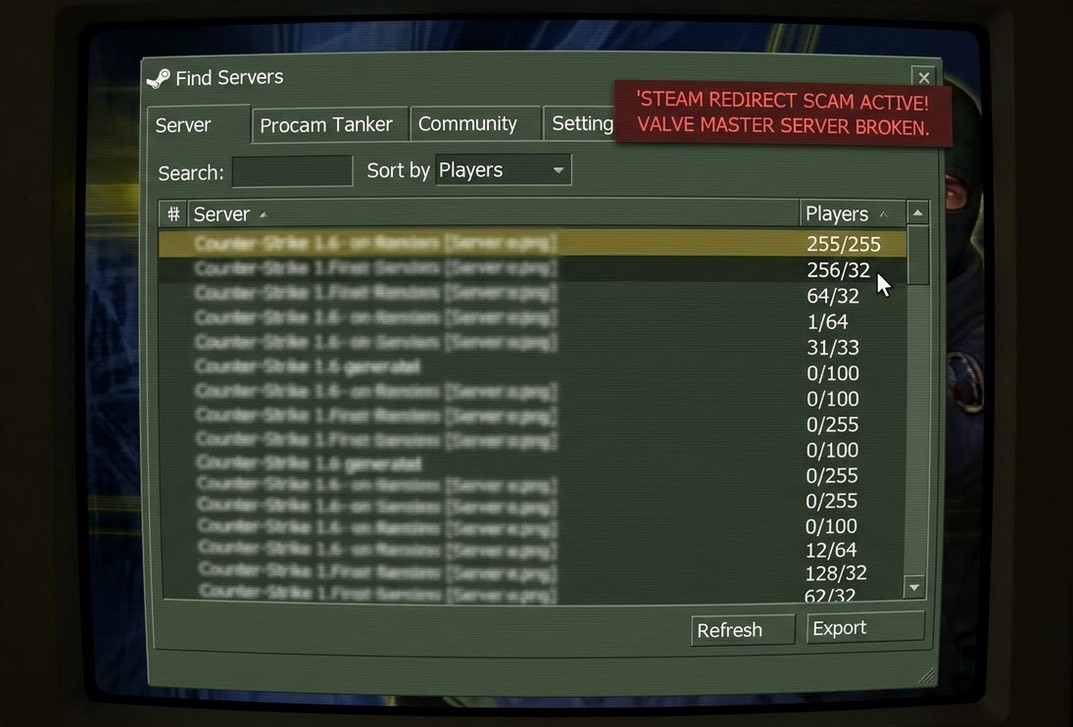
If you’re still using Steam to play this game and find Counter-Strike 1.6 servers, you’ve probably noticed that the “Find Servers” tab has turned into a total disaster.
It’s not just a glitch or a few bad servers, the entire system has been hijacked by scammers.
Take a look at the list. You’ll see impossible player counts like 255/255, 256/32, 64/32, or weird entries like 1/64 and 31/33. Have you ever wondered why these servers look full, but the moment you hit “Connect,” you end up in a completely different, laggy, or empty server?
You are being sold as traffic
This isn’t a mistake; it’s a massive, coordinated Redirect Business. Here is how they are using your PC for profit:
-
The Bait: Scammers use automated scripts to flood Valve’s MasterServer with thousands of “ghost” entries. They spoof numbers like 255/255 because they know these will pop up at the top of your list. It’s a digital fishing net designed to catch frustrated players looking for a game.
-
The Hook: When you click that “Connect” button, the fake server intercepts your request. Before you even see a loading bar, it forces your client to execute a hidden command, redirecting you to a different IP.
-
The Profit: This is the dirty part. Real server owners pay these “boost providers” cold hard cash to fill their empty slots. Every time you are tricked into a redirect, the scammer gets paid for the “click.” To them, you aren’t a human player, you are just a unit of traffic being sold to the highest bidder.
Valve has essentially abandoned the Steam version of CS 1.6, leaving the doors wide open for these exploiters to ruin the experience for everyone.
Quick Summary for Frustrated Players:
- The Reality: These are not real servers; they are redirect traps using UDP flood exploits with fake slot counts.
- The Risk: Connecting to these entries allows Server-side Command Injection, which can overwrite your
GameMenu.resand ruin your binds. - The Only Way Out: Stop using the broken Steam MasterServer. The only way to get a clean list is to use a protected client like csdownload.net which blocks these exploits by default.
How the Fake Player Count Scam Works
Seeing a server with 255, 100, or 76 slots is a technical red flag. The GoldSource engine is hard-coded for a maximum of 32 slots. These entries are “Redirect Traps” created by malicious boost providers to farm players.
They use any number that catches your eye, whether it’s a completely full “impossible” server or a suspiciously high slot count, just to get you to click.
MasterServer.vdf UDP Flood Exploit
The reason your Steam list is filled with trash is a fundamental flaw in Valve’s infrastructure. Scammers use automated scripts to exploit the MasterServer.vdf announcement system:
- Zero Verification: Valve’s MasterServer accepts data from any IP without verifying if a real game server exists.
- Sorting Manipulation: By reporting fake numbers like 255/255 or 64/64, these scripts force their way to the top of your list when you sort by “Players” or “Max Slots.”
- IP Spoofing: A single scammer can register thousands of “ghost” IPs with different fake counts (like 31/33 or 0/76), completely pushing real, legitimate servers off your screen.
Is there a Manual Fix for Steam Users?
The short answer is: Not really. Because the problem exists on Valve’s MasterServer (the source of the list), you cannot simply “delete” these servers from your Steam client. However, here is what players try to do to survive:
- The “Read-Only” Shield: This is the most common advice. Players set their
config.cfgandGameMenu.resto “Read-Only” in the file properties. Does it work? It won’t clean your server list, but it stops malicious servers from trashing your settings. If you are having trouble with your settings, check our guide on fixing CS 1.6 settings not saving. - Replacing MasterServer.vdf: Some suggest downloading a community-made MasterServer file. The problem? Steam often overwrites this file automatically. If your list is completely empty, you might need a MasterServer fix to see any servers at all.
- External Browsers: You can skip the broken Steam browser entirely by using external sites like GameTracker.com to find legitimate IPs and connecting via console (
connect IP). - Play on Trusted Servers: Instead of searching through thousands of fakes, you can join our own verified community at www.procs.lt. We host several cs 1.6 servers that are always online and safe, so you can jump straight into the action without worrying about redirects.
In short, there is no 100% manual fix for the official Steam client. As long as you use Valve’s default browser, you are swimming in a pool of redirects.
The only real way to play safely is to connect directly to trusted IPs or switch to a protected build.
SlowHacks, Fake Menus and Trashed Configs
This is where it gets dangerous for your game files. These redirect servers use Server-side Command Injection to modify your client settings without your permission.
How Malicious Servers Hijack your Client
Once you connect to a malicious redirect, the server can execute commands directly in your console:
- GameMenu.res Overwrite: Your main menu is hijacked. Instead of “New Game” or “Find Servers,” you see links to the scammer’s favorite servers.
- Auto-binds: Your essential keys are bound to commands that advertise websites. Restore your controls using our best CS 1.6 config.
- Trash File Injection: Your
cstrikefolder is filled with useless files. If you encounter errors, you may need to fix missing .wad files manually.
Why Steam is Currently the Worst Way to Play
It is a hard truth for the community: if you are playing Counter-Strike 1.6 on Steam, you are the primary victim of these scams.
- Valve’s Neglect: Valve continues to sell CS 1.6 but provides zero moderation for the MasterServer.
- Zero File Protection: The official Steam build has no built-in “Shield” to prevent servers from overwriting your files.
- The “Product” Status: You are the fuel for the CS 1.6 Boost industry.
Official Steam vs. csdownload.net Protected Build
| Feature | Official Steam Version | csdownload.net Optimized Build |
|---|---|---|
| Server List Status | Flooded with 255, 64, 76 player fakes | 100% Moderated & Clean |
| Security (SlowHacks) | Vulnerable (Files overwritten) | Immune (Read-only Shield) |
| Windows 11 Optimization | Poor (Input lag/Flickering) | Fully Patched & Optimized |
| MasterServer Quality | Unmoderated / Abandoned | Private & Protected Source |
| User Experience | Frustrating / Scammed | Reliable / Authentic |
Why Our Build is Immune to Redirect Scams
The version available on csdownload.net is designed to bypass the Steam MasterServer trash entirely.
- Private MasterServer: Our client connects to a filtered list where fake slot counts and redirects are banned instantly.
- Read-Only Shield by Default: We have implemented a protection system at the engine level.
- Engine Fixes: We’ve patched legacy GoldSource bugs that Valve ignores.
Visit our homepage to download Counter-Strike 1.6 and play the game without the trash.
For the best performance and results, see all the available game resources as well as get the download Counter-Strike 1.6 full version.