
CS 1.6 Fake Servers 255/255 – Redirect Scam Explaining – Fix
Last updated: May 9, 2026
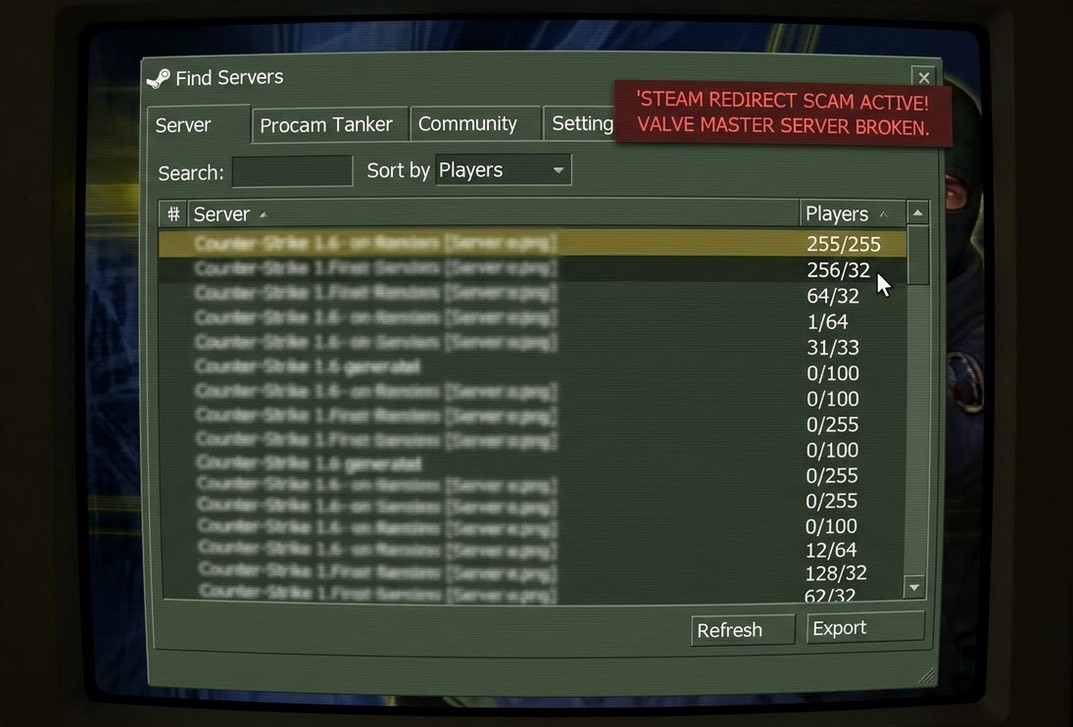
If you open the CS 1.6 server browser and see hundreds of servers showing 255/255, 256/32, 64/32 or similar impossible player counts, you are looking at CS 1.6 fake servers. The GoldSrc engine has a hard limit of 32 player slots – any server showing more than 32 is either a fake entry or is exploiting a bug in how the Steam browser reads player counts. This page explains how the fake player count scam works, what happens when you connect to one of these servers, and how to protect and recover your files.
Table of Contents
- How CS 1.6 fake player counts work
- What happens when you connect to a fake server
- Slowhacks – how malicious servers modify your files
- How to fix and protect yourself from CS 1.6 fake servers
- Recovering after a slowhack
How CS 1.6 fake player counts work
The CS 1.6 server browser works by querying Valve’s MasterServer for a list of active servers, then pinging each one individually to get real-time data including the player count. The exploit behind CS 1.6 fake servers with 255 players was documented on Valve’s own GitHub in 2024 (issue #3805): a malicious server sends a spoofed A2S_INFO response packet where the NumPlayers field is set equal to MaxPlayers, making the server appear full regardless of how many real players are connected.
This exploits a flaw in ServerBrowser.dll – the Steam client trusts the player count reported directly by the server in the A2S_INFO response instead of cross-checking it against the MasterServer data. The result is that a server with zero real players can display 255/255, 64/32, or 31/33 in your browser. The impossible numbers like 256/32 and 255/255 appear because scammers deliberately pick numbers that look full or stand out, pushing their entries to the top when you sort by player count.
Valve’s MasterServer accepts server announcements from any IP without verifying that a real game server is running there. A single automated script can flood the MasterServer with thousands of ghost entries using different fake slot counts, pushing legitimate servers completely off your visible list.
What happens when you connect to a fake server
When you click Connect on a CS 1.6 fake server, the server does not drop your connection – it intercepts it and forces your client to connect to a different IP. This is the redirect. The console output during a redirect looks like this:
Connecting to 46.183.149.65:27015...
Redirecting connection to 95.28.194.121:27019.
Connecting to 95.28.194.121:27019...
The redirect itself is technically a legitimate feature of the GoldSrc engine – it was designed to let servers move players to a different address during maintenance. Malicious server operators abuse it to route players to paying customers’ servers. Real server owners pay “boost providers” to send them player traffic this way – every redirected connection is a transaction where you are the product being sold.
The redirected destination server may be empty, laggy, in a different country, or running a completely different game mode than what the fake entry advertised. You have no way to know before connecting.
Slowhacks – how malicious servers modify your files
The redirect is only the first part of the problem. Many CS 1.6 fake servers also execute a slowhack when you connect. A slowhack is a server-side command injection attack where the server uses the client_cmd function in AMXX to execute console commands directly on your game client without your knowledge or consent.
Slowhacking was documented on the Valve Developer Community wiki and on the CS 1.6 GitHub issue tracker. The attack works because GoldSrc allows servers to send stuffcmd packets that execute arbitrary console commands on the client. Common slowhack payloads include:
| File or setting affected | What the attacker changes | Result you see |
|---|---|---|
GameMenu.res |
Main menu entries replaced with the attacker’s server links | Your main menu shows “Play on [server name]” instead of normal options |
| Key bindings | unbindall followed by custom binds for Z, X, C keys |
Pressing Z/X/C in chat spams advertising messages in server chat |
config.cfg |
Rate settings set to minimum, FPS capped at 1, hideradar added |
Game becomes unplayable until you restore the file |
MasterServers.vdf |
Replaced with a list pointing only to attacker-controlled servers | Your server browser only shows the attacker’s servers |
| Favorites list | Attacker’s servers added to your favorites | Your Favorites tab is filled with servers you never added |
Valve added cl_filterstuffcmd in a February 2013 update to restrict which commands servers can execute on clients. However, as documented on GitHub (issue #2856), this protection was bypassed – malicious servers use a specific AMXX message type (MSG_ONE type 51) that bypasses the filter entirely. The protection exists but is incomplete.
How to fix and protect yourself from CS 1.6 fake servers
Enable cl_filterstuffcmd
This is the first line of defense. Open the console and type:
cl_filterstuffcmd 1Add this to cstrike/userconfig.cfg so it applies on every launch. This blocks the most basic slowhack attempts using the standard stuffcmd path. It does not block all methods but reduces the attack surface significantly.
Set config.cfg and GameMenu.res to Read-Only
Setting your critical files to Read-Only prevents any server from overwriting them. The game can still read these files normally – it simply cannot modify them.
- Open your
cstrikefolder. - Right-click
config.cfgand select Properties. - Check Read-only and click Apply.
- Repeat for
GameMenu.resincstrike/resource/.
This is the most effective manual protection available against file modification attacks. A server can still send commands to your console but cannot permanently write changes to these files.
Avoid connecting to servers with impossible player counts
Never connect to any CS 1.6 server showing more than 32 players – the GoldSrc engine cannot support more than 32 slots, so any entry showing 33 or more is either fake or exploiting a count spoofing bug. Specific patterns to recognize and avoid:
| Player count shown | Why it is fake |
|---|---|
| 255/255 or 256/32 | Impossible – GoldSrc maximum is 32 slots |
| 64/64 or 128/128 | Impossible – hard engine limit exceeded |
| 31/33 or 1/64 | MaxPlayers exceeds 32 – impossible on standard CS 1.6 |
| Any server with implausibly low ping (under 5ms) from a distant location | Ping is also spoofed in the fake A2S_INFO response |
Use external server lists instead of the Steam browser
The Steam server browser queries Valve’s unmoderated MasterServer directly. Third-party server tracking sites apply their own filtering before displaying servers, which removes many of the fake entries. Sites that filter CS 1.6 server lists:
| Site | Notes |
|---|---|
| gametracker.ovh | Community-maintained, built specifically to filter CS 1.6 fake servers. Searchable by name, map, country. |
| battlemetrics.com | Marks servers suspected of botting with NR rank, hidden by default. |
| gametracker.com | Long-established tracker, apply country and map filters to find legitimate servers. |
Once you find a legitimate server IP on any of these sites, connect directly via console to bypass the browser entirely:
connect [server IP]:[port]Windows Firewall IP blocking – goldsrc-fake-servers-firewall
Community developer Ch0wW created a PowerShell script that downloads a maintained list of known fake server IP ranges and adds them as outbound block rules in Windows Firewall. Once applied, your client never receives responses from those IPs – they disappear from your server browser entirely at the network level before the game even processes them. The project is actively maintained on GitHub: github.com/Ch0wW/goldsrc-fake-servers-firewall
This works on Windows 10 and 11 only. To install:
- Press Win + X and select Windows PowerShell (Admin) or Terminal (Admin).
- Copy and paste the following command exactly as shown, then press Enter:
Set-ExecutionPolicy Bypass -Scope Process -Force; [System.Net.ServicePointManager]::SecurityProtocol = [System.Net.ServicePointManager]::SecurityProtocol -bor 3072; iex ((New-Object System.Net.WebClient).DownloadString('https://raw.githubusercontent.com/Ch0wW/goldsrc-fake-servers-firewall/main/BlockFakeServers.ps1'))The script downloads a JSON file containing the list of fake server IPs and creates a single outbound Windows Firewall rule that blocks all of them. If the rule already exists from a previous run, it recreates it with the latest list. Running the script again at any time updates the blocklist to the most current version.
After running the script, relaunch CS 1.6 and open Find Servers – the fake entries blocked by the list will no longer appear. Legitimate servers are not affected. Note that this is a community-maintained blocklist and cannot cover every fake server IP as new ones appear constantly – it reduces the problem significantly but does not eliminate it entirely.
Recovering after a slowhack
If you have already connected to a malicious server and your files have been modified, here is how to restore them:
| What was changed | How to restore |
|---|---|
| Key bindings overwritten | Open the console, type unbindall, then manually rebind your keys. Or delete config.cfg and let the game regenerate it. See the CS 1.6 config guide for correct binds. |
| GameMenu.res replaced | Delete the file from cstrike/resource/. The game regenerates a default on next launch. Then set it to Read-only immediately. |
| config.cfg corrupted | Delete cstrike/config.cfg. The game regenerates a clean default. Then set it to Read-only. See the CS 1.6 settings fix guide if settings are not saving after deletion. |
| MasterServers.vdf replaced | Replace the file with the current community version. See the MasterServer fix guide for the correct file. |
| Trash files injected into cstrike folder | Any .wad, .cfg, or .res file you did not install yourself can be deleted. If you encounter missing file errors after cleanup, see the corrupted files fix guide. |
After restoring all files, set config.cfg, GameMenu.res, and MasterServers.vdf to Read-only immediately and add cl_filterstuffcmd 1 to userconfig.cfg before connecting to any server again. If you need a clean CS 1.6 installation without compromised files, download a fresh CS 1.6 build and install it to a new folder.
For more CS 1.6 resources, visit the Counter-Strike 1.6 homepage as well as get the Counter-Strike 1.6 download.