
HLSW 1.4.0.5 Download: CS 1.6 Server Browser with Fixes
Last updated: May 6, 2026
HLSW (Half-Life Server Watch) is a server browser and remote administration tool for GoldSrc and Source engine games including Counter-Strike 1.6. The official release is outdated – this community-patched version 1.4.0.5 fixes broken RCON on modern Source servers, corrects HL2 game detection errors, and adds support for 40+ games beyond Valve’s core library.
HLSW 1.4.0.5 Download – Server Browser with Community Fixes

The archive includes both the base HLSW 1.4.0.5 installer and the community patch files. Both are required for full functionality.
How to Install HLSW 1.4.0.5 with Community Fixes
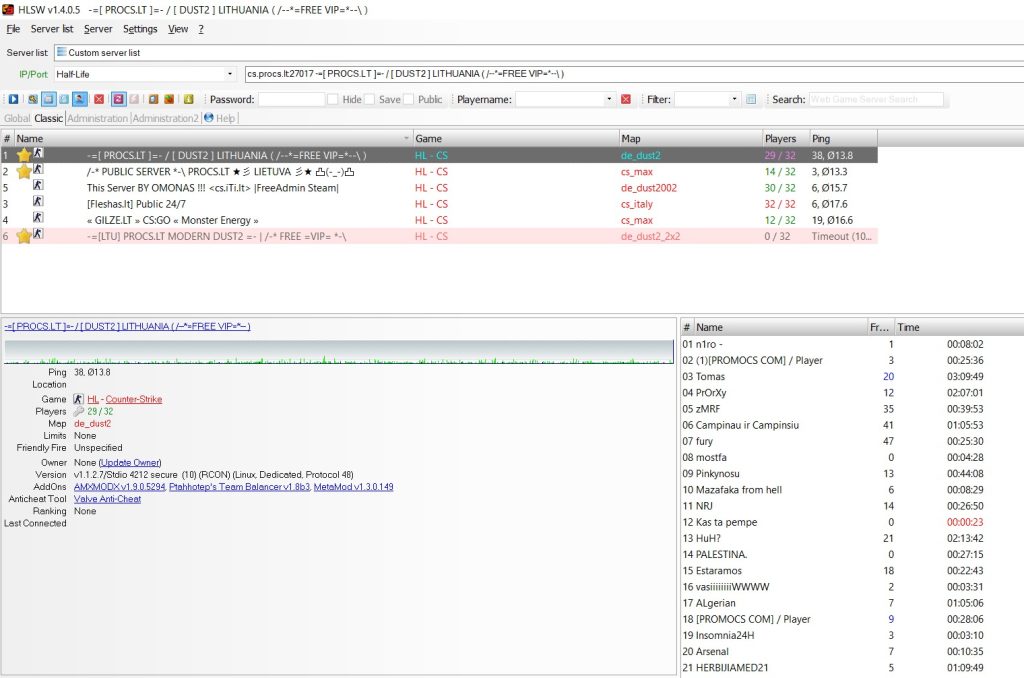
HLSW Base Installation
- Download the archive using the link above.
- Extract the archive.
- Run
HLSW 1.4.0.5 Setup.exe. - Install to the default path:
C:\Program Files (x86)\HLSW
Apply HLSW Community Patch Files
- Inside the extracted archive, locate the folder named
hlsw. - Copy all files and folders inside the
hlswdirectory to your HLSW installation folder:C:\Program Files (x86)\HLSW - Confirm overwrite when prompted.
- Launch HLSW.
The patch files must overwrite the originals – without this step RCON and game detection remain broken.
HLSW 1.4.0.5 Fixes – What Changed from Official Version
| Fix | Problem | What Changed |
|---|---|---|
| Source engine RCON fix | RCON commands failed on modern Source servers (CS:GO, TF2) | Network protocol overhauled – RCON now works correctly on all supported Source titles |
| HL2 game detection fix | Half-Life 2 servers listed as Half-Life 1, caused launch failures | Steam AppID parsing corrected – servers identified and launched correctly |
| Network polling stability | Ping data inaccurate or refreshing slowly for CS 1.6 servers | Polling stabilized – real-time accurate ping data for all servers |
HLSW 1.4.0.5 Supported Games List
| Category | Games |
|---|---|
| Survival and sandbox | 7 Days to Die, ARK: Survival Evolved, Hurtworld, Medieval Engineers, Rust, Space Engineers, Starbound |
| Tactical and classic FPS | Arma 3, Black Mesa: Deathmatch, Codename Cure, Contagion, CS:GO, Counter-Strike 1.6, Day of Defeat, Day of Infamy, Half-Life, Half-Life: Opposing Force, Homefront, Insurgency, Killing Floor 2, Natural Selection 2, No More Room in Hell, Serious Sam 3, Serious Sam HD, Sniper Elite 3, Sniper Elite v2, Squad, Sven Co-op, Team Fortress Classic |
| Action and mod games | Blade Symphony, BrainBread 2, Chivalry: Medieval Warfare, Double Action: Boogaloo, Dota 2, Dystopia, Empires, Fistful of Frags, GoldenEye: Source, Just Cause 2, NEOTOKYO, Pirates Vikings and Knights II, Ricochet, The Ship, War of the Roses |
HLSW Query Port Format for Non-Valve Servers
Some servers require a manually specified query port when added to HLSW. Use this format:
[IP address]:[game port]:[query port]Games that typically require this: 7 Days to Die, Battlefield: Bad Company 2, Hurtworld, Natural Selection 2. For Natural Selection 2 the query port is usually the game port + 1.
For configs, fixes and other downloads, check the official CS 1.6 page or download CS 1.6 for PC.