
CS 1.6 Download Pakistan – Counter-Strike 1.6 Free PC Setup
Players in Pakistan can download CS 1.6 complete setup free for PC and laptop from this page. The Counter-Strike 1.6 free download comes in three formats: EXE installer, ZIP with no installation and RAR archive. Pick the file that suits your internet speed and get CS 1.6 for PC directly with the secure links below.
This is the classic Counter-Strike 1.6 full version in Non-Steam format: version 1.1.2.6, Build 4554, Protocol 48. You can play online on local servers, over LAN with friends, or offline against bots without any heavy system requirements.
CS 1.6 Download in Pakistan – Free Full Version for PC
Choose how you want to download Counter-Strike 1.6 setup. Files are small, perfect for standard PTCL connections or mobile data:
Download CS 1.6 – ZIP, No Installation (205 MB)
Download CS 1.6 – RAR (185 MB)
- ✓EXE installer: The easiest setup. Run the file, install, and play immediately.
- ✓ZIP (portable): No installation needed. Extract the folder and start the game instantly. Great for USB drives.
- ✓RAR: The same full game in a smaller, compressed archive. Open it with WinRAR or 7-Zip.

CS 1.6 Download Details
| Game | Counter-Strike 1.6 (Full Setup) |
| Version | 1.1.2.6 |
| Build | 4554 |
| Protocol | 48 |
| Type | Non-Steam |
| EXE installer | 156 MB |
| ZIP, no installation | 205 MB |
| RAR | 185 MB |
| Ads / Bloatware | None (Clean Files) |
| Game modes | Online Multiplayer, LAN, and Offline |
| Bots | Included (ZBots) |
| Security Scan | VirusTotal Clean (EXE installer) |
Counter-Strike 1.6 in Pakistan – From Net Cafes to Home PCs
Across cities like Karachi, Lahore, Islamabad, and Rawalpindi, Counter-Strike 1.6 built the local “Gaming Zone” era of the 2000s and 2010s. After school and college, students packed cramped net cafes, navigating frequent power load shedding just to play 5v5 LAN matches on de_dust2, cs_assault, de_inferno, and fy_pool_day. Rooms echoed with Urdu callouts, desk slams, and intense clan matches where losers paid for chai or cold drinks.
As internet access expanded, players brought the game home. CS 1.6 remains incredibly popular in Pakistan because it requires minimal bandwidth. Whether you are using a standard broadband connection or tethering via a 4G mobile hotspot, the netcode of CS 1.6 ensures smooth gameplay without massive data consumption.
To this day, the Pakistani CS community relies on the standard 1.1.2.6 version (Build 4554, Protocol 48). By keeping the original weapon recoil, default character models, textures, and classic audio without heavy bloatware, local servers ensure low latency and smooth frame rates across the country — Terrorists against Counter-Terrorists, exactly as it was played in the neighborhood cafes.
What you get with this CS 1.6 setup
- •Online servers: Easily find active CS 1.6 servers inside the game through the ‘Find Servers’ browser.
- •Favorites: Save your favorite local low-ping servers to join them quickly.
- •LAN Ready: Play Counter-Strike 1.6 with friends on the same local network, recreating the cafe experience.
- •Bots Included: Practice offline against computer-controlled players without needing an internet connection.
- •No Adware: The installer is completely clean and adds no ads, toolbars, or extra unwanted programs.
- •Optimized for Low-End: Runs perfectly on dual-core processors and integrated graphics.
CS 1.6 for Low-End PC and Laptops
CS 1.6 is perfect for a low-end PC. It runs flawlessly on older family laptops, standard office computers, and budget PCs without needing a dedicated gaming graphics card.
System Requirements for CS 1.6
| Component | Minimum | Recommended |
|---|---|---|
| Processor | 500 MHz | 800 MHz (Dual Core is more than enough) |
| RAM | 96 MB | 128 MB or higher |
| Graphics | 16 MB, OpenGL | 32 MB (Intel HD graphics work perfectly) |
| System | Windows XP up to Windows 11 (32-bit & 64-bit) | |
The installation requires less than 500 MB of free hard drive space. The game is highly optimized to run smoothly on virtually any hardware found in Pakistani homes today.
CS 1.6 Download for Windows 10 & 11 (64-bit/32-bit)
This setup is fully compatible with modern operating systems. You can confidently install CS 1.6 on Windows 11, Windows 10, and older versions like Windows 7. It supports both 32-bit and 64-bit architectures automatically.
How to Install Counter-Strike 1.6 on PC
Option 1: EXE Installer (Recommended)
- Click the Download CS 1.6 – EXE Installer button above.
- Wait for the fast 156 MB download to finish.
- Double-click the downloaded EXE file.
- Follow the simple prompts and choose your installation folder (e.g., C:\Games\CS 1.6).
- Click Install.
- Once finished, launch the game from the new desktop shortcut.
Option 2: ZIP / Portable Version (No Installation)
- Click Download CS 1.6 – ZIP, No Installation.
- Once downloaded, right-click the ZIP file.
- Select Extract All… (or use software like WinRAR/7-Zip).
- Open the newly extracted folder.
- Double-click
hl.exeto launch the game instantly.
Option 3: RAR Archive
- Click Download CS 1.6 – RAR.
- Open the downloaded RAR file using WinRAR or 7-Zip.
- Choose Extract Here or specify a folder on your drive.
- Open the extracted folder.
- Double-click
hl.exeto play.
Note: The ZIP and RAR versions do not touch your Windows registry. You can copy the extracted folder to a USB drive and play it on any computer.
Play CS 1.6 Online: Getting Low Ping in Pakistan
Playing multiplayer is where CS 1.6 shines. To join CS 1.6 online servers, simply use the in-game browser:
- Start Counter-Strike 1.6.
- Click Find Servers on the main menu.
- Click on the Internet tab.
- Wait for the global server list to populate.
- Crucial Step for Pakistan: Click on the “Latency” (Ping) column header to sort servers from lowest to highest ping.
For the smoothest experience without lag, look for servers hosted directly in Pakistan, India, or the UAE (Middle East). These will typically offer a ping between 20ms and 80ms. You can also manually add active servers by finding IP addresses on sites like GameTracker (Pakistan filters) and adding them to your Favorites tab.
CS 1.6 with Bots – Play Offline Anytime
Internet down due to load shedding? No problem. CS 1.6 with bots allows you to play full matches completely offline. The necessary bot files are pre-installed in this download.
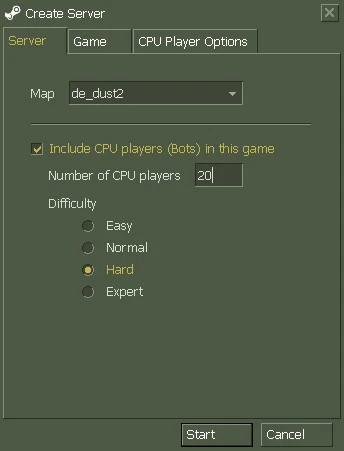
- Start the game and select New Game.
- In the Create Server window, select your favorite map (like de_dust2).
- Check the box next to Include CPU players (Bots) in this game.
- Under Number of CPU players, specify how many bots you want to fight.
- Select a difficulty level: Easy, Normal, Hard, or Expert.
- Click Start to generate the map.
You can also control bots on the fly using the developer console (`~` key):
bot_add_ct
bot_add_t
bot_difficulty 2
bot_kick
- ›
bot_add_ctspawns a new bot on the Counter-Terrorist team. - ›
bot_add_tspawns a new bot on the Terrorist team. - ›
bot_difficulty 2adjusts AI skill (0=easy, 1=normal, 2=hard, 3=expert). Requires a map restart to apply. - ›
bot_kickremoves all bots from the current match immediately.
CS 1.6 Non-Steam (No Account Required)
This package provides a CS 1.6 Non-Steam free download. This means you do not need to install the Steam client or create an account to play.
- Play instantly: Download, install, and jump straight into a game.
- Community Servers: Access thousands of public Non-Steam servers globally.
- Offline Independence: Play LAN or bot matches without needing internet verification.
Disclaimer: The official version of Counter-Strike is developed and distributed by Valve via Steam. This page provides a modified non-steam community build and is not affiliated with Valve.
Is this CS 1.6 Setup Safe and Virus-Free?
Yes. We understand players are wary of downloading game setups that might contain malware. The EXE installer provided here is guaranteed clean and was scanned thoroughly on VirusTotal showing zero threats. It installs only the game files—no background miners, no toolbars, and no hidden ads.
Note on Windows SmartScreen: When you open the EXE file, Windows 10 or 11 might display a blue box saying “Windows protected your PC.” This is a generic warning because the free installer does not have a paid digital publisher certificate. It does not mean a virus was found.
To proceed with the installation, simply click More info on that blue screen, and then click the Run anyway button that appears.
CS 1.6 Download FAQ (Pakistan)
Is CS 1.6 free to download in Pakistan?
Yes, the Non-Steam version provided on this page is 100% free to download and play without any hidden charges or subscriptions.
Is this the complete setup of CS 1.6?
Yes, this is the full version. It includes all default maps (like de_dust2), player models, weapon sounds, and required system files to run the game flawlessly.
Which version of CS 1.6 is this?
This is the standard and most stable release: Version 1.1.2.6, Build 4554, Protocol 48. This is the exact version preferred by local gaming zones for LAN tournaments.
My internet is slow. How big is the CS 1.6 file?
The files are heavily compressed to save your bandwidth. The EXE installer is only 156 MB, the ZIP is 205 MB, and the RAR is 185 MB. It downloads quickly even on slower 3G/4G or PTCL connections.
Will CS 1.6 work on Windows 10 64-bit?
Yes, the game is fully compatible with Windows 10 and Windows 11, natively supporting both 32-bit and 64-bit operating systems without requiring special compatibility modes.
How can I fix high ping on Pakistani servers?
Ensure no background apps are downloading data. In the server browser, sort by “Latency” and only join servers hosted in PK, IN, or UAE. Avoid EU or US servers if you want ping below 100ms.
What languages are supported in the game?
The game interface and menus are in English. However, on local multiplayer servers, you will find players actively chatting and using voice comms in Urdu and regional languages.
Get Your CS 1.6 Setup Now
Download the clean, full version of Counter-Strike 1.6 and relive the golden era of gaming on your PC today.