
CS 1.6 Crosshair Color: Best Colors & Full List
Last updated: May 1, 2026
Counter-Strike 1.6 Crosshair Color
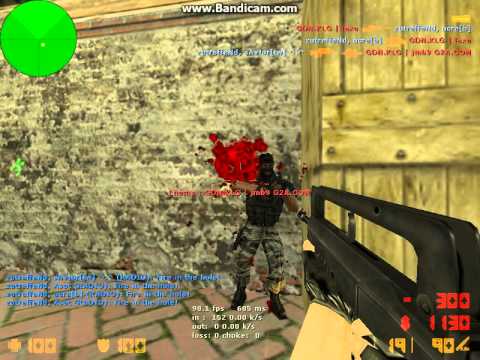
Your CS 1.6 crosshair color directly affects how fast you spot enemies and lock onto targets. The wrong color disappears against map textures. The right color stays visible in every situation. This page covers how to change your counter-strike 1.6 crosshair color, which colors work best on which maps, and the full RGB color list with visual previews.
- How to Change Crosshair Color in CS 1.6
- What Is the Best CS 1.6 Crosshair Color?
- CS 1.6 Crosshair Color by Map
- Full CS 1.6 Crosshair Color List
- How to Save Crosshair Color Permanently
- FAQ
How to Change Crosshair Color in CS 1.6

Changing the crosshair color in counter-strike 1.6 takes three steps:
- Open the game and press ~ to open the developer console. If the console does not open, go to Options → Keyboard → Advanced and enable it.
- Pick a color from the list below and type the exact command into the console. Example:
cl_crosshair_color "0 255 0"sets a green crosshair. - Press Enter. The crosshair color changes immediately.
Important: If the color does not appear correctly, also run cl_crosshairusealpha 1 in the console. Without this, CS 1.6 uses additive blending which causes colors to disappear on bright surfaces. For all other crosshair commands beyond color, see the CS 1.6 crosshair settings guide. If you do not have the game installed, download Counter-Strike 1.6 first.
What Is the Best CS 1.6 Crosshair Color?
The best crosshair color in CS 1.6 is one that contrasts sharply against the map environment. CS 1.6 maps use brown, grey, dark green, and beige textures — most natural colors blend into these surfaces and become invisible at the wrong moment.
Green (cl_crosshair_color "0 255 0") is the most popular cs 1.6 crosshair color among competitive players. It appears on almost no surface in the game, making it visible on every map. Cyan (cl_crosshair_color "0 255 255") performs similarly and stands out on dark maps like cs_assault and de_inferno. Yellow (cl_crosshair_color "255 255 0") works well on dark outdoor maps. White (cl_crosshair_color "255 255 255") is highly visible but can disappear on bright surfaces like de_nuke. Red (cl_crosshair_color "255 0 0") blends into brick textures on de_dust2 — avoid it as a primary color.
AWP players often use a dim shade like dark slate gray since they rely on the scope. If your AWP crosshair dot is missing entirely, check this AWP crosshair dot fix. Entry fraggers benefit most from bright colors — a good crosshair color also helps with improving aim in CS 1.6.
CS 1.6 Crosshair Color by Map
No single crosshair color works perfectly on every counter-strike 1.6 map. Here is what performs best by surface type:
| Map Type | Best Color | Avoid |
|---|---|---|
| Desert maps (de_dust2, de_dust) | Green, Cyan, Blue | Yellow, Orange, Brown |
| Dark indoor maps (cs_assault, de_inferno) | Yellow, Cyan, White | Black, Dark Green |
| Bright outdoor maps (de_nuke, de_train) | Green, Red, Magenta | White, Light Gray |
| Snow maps (de_arctic) | Red, Green, Cyan | White, Light Blue |
Full CS 1.6 Crosshair Color List
All available counter-strike 1.6 crosshair colors with RGB codes and visual previews. Copy any command and paste it directly into the console.
| Color | Preview | Console Command |
|---|---|---|
| Snow | cl_crosshair_color "255 250 250" |
|
| Moccasin | cl_crosshair_color "255 228 181" |
|
| Cornsilk | cl_crosshair_color "255 248 220" |
|
| Ivory | cl_crosshair_color "255 255 240" |
|
| Lemon Chiffon | cl_crosshair_color "255 250 205" |
|
| Seashell | cl_crosshair_color "255 245 238" |
|
| Honeydew | cl_crosshair_color "240 255 240" |
|
| Mint Cream | cl_crosshair_color "245 255 250" |
|
| Azure | cl_crosshair_color "240 255 255" |
|
| Alice Blue | cl_crosshair_color "240 248 255" |
|
| Misty Rose | cl_crosshair_color "255 228 225" |
|
| White | cl_crosshair_color "255 255 255" |
|
| Black | cl_crosshair_color "0 0 0" |
|
| Dark Slate Gray | cl_crosshair_color "47 79 79" |
|
| Light Slate Gray | cl_crosshair_color "119 136 153" |
|
| Grey | cl_crosshair_color "190 190 190" |
|
| Light Gray | cl_crosshair_color "211 211 211" |
|
| Midnight Blue | cl_crosshair_color "25 25 112" |
|
| Royal Blue | cl_crosshair_color "65 105 225" |
|
| Blue | cl_crosshair_color "0 0 255" |
|
| Pale Turquoise | cl_crosshair_color "175 238 238" |
|
| Dark Turquoise | cl_crosshair_color "0 206 209" |
|
| Medium Turquoise | cl_crosshair_color "72 209 204" |
|
| Turquoise | cl_crosshair_color "64 224 208" |
|
| Dark Green | cl_crosshair_color "0 100 0" |
|
| Pale Green | cl_crosshair_color "152 251 152" |
|
| Green | cl_crosshair_color "0 255 0" |
|
| Green Yellow | cl_crosshair_color "173 255 47" |
|
| Yellow Green | cl_crosshair_color "154 205 50" |
|
| Pale Goldenrod | cl_crosshair_color "238 232 170" |
|
| Light Goldenrod Yellow | cl_crosshair_color "250 250 210" |
|
| Yellow | cl_crosshair_color "255 255 0" |
|
| Gold | cl_crosshair_color "255 215 0" |
|
| Goldenrod | cl_crosshair_color "184 134 11" |
|
| Rosy Brown | cl_crosshair_color "188 143 143" |
|
| Indian Red | cl_crosshair_color "205 92 92" |
|
| Saddle Brown | cl_crosshair_color "139 69 19" |
|
| Sienna | cl_crosshair_color "160 82 45" |
|
| Beige | cl_crosshair_color "245 245 220" |
|
| Sandy Brown | cl_crosshair_color "244 164 96" |
|
| Brown | cl_crosshair_color "165 42 42" |
|
| Orange | cl_crosshair_color "255 165 0" |
|
| Dark Orange | cl_crosshair_color "255 140 0" |
|
| Tomato | cl_crosshair_color "255 99 71" |
|
| Orange Red | cl_crosshair_color "255 69 0" |
|
| Red | cl_crosshair_color "255 0 0" |
|
| Hot Pink | cl_crosshair_color "255 105 180" |
|
| Deep Pink | cl_crosshair_color "255 20 147" |
|
| Pink | cl_crosshair_color "255 192 203" |
|
| Light Pink | cl_crosshair_color "255 182 193" |
|
| Pale Violet Red | cl_crosshair_color "219 112 147" |
|
| Violet Red | cl_crosshair_color "208 32 144" |
|
| Magenta | cl_crosshair_color "255 0 255" |
|
| Violet | cl_crosshair_color "238 130 238" |
|
| Purple | cl_crosshair_color "160 32 240" |
|
| Cyan | cl_crosshair_color "0 255 255" |
|
| Dark Red | cl_crosshair_color "139 0 0" |
|
| Dark Blue | cl_crosshair_color "0 0 139" |
|
| Teal | cl_crosshair_color "0 128 128" |
|
| Olive | cl_crosshair_color "128 128 0" |
|
| Navy | cl_crosshair_color "0 0 128" |
|
| Maroon | cl_crosshair_color "128 0 0" |
How to Save CS 1.6 Crosshair Color Permanently
The crosshair color entered in the console resets when you close CS 1.6. To keep it permanently, add both commands to your userconfig.cfg file inside the cstrike folder:
- Open your CS 1.6 installation folder and navigate to the
cstrikefolder. - Open
userconfig.cfgwith any text editor. Create the file if it does not exist. - Add these two lines and save:
cl_crosshair_color "0 255 0"
cl_crosshairusealpha 1
Replace "0 255 0" with any color from the list above. If settings keep resetting despite this, see the full guide on how to save CS 1.6 settings permanently.
CS 1.6 Crosshair Color FAQ
Q: Why does my crosshair color keep resetting?
A: Console commands are temporary. Add both commands to userconfig.cfg as described above.
Q: Why does my crosshair color disappear on bright surfaces?
A: Run cl_crosshairusealpha 1 in the console. If the crosshair moves on its own instead, that is a separate issue — see how to fix crosshair moving on its own.
Q: What crosshair color do pro CS 1.6 players use?
A: Most use green (cl_crosshair_color "0 255 0") or cyan (cl_crosshair_color "0 255 255"). Both appear on no natural surface in CS 1.6 maps.
For more Counter-Strike 1.6 content, browse the Counter-Strike 1.6 site or also grab the Counter-Strike 1.6 installer.
esports
[…]here are some links to internet sites that we link to due to the fact we feel they’re really worth visiting[…]
shaka
[…]although internet sites we backlink to below are considerably not related to ours, we feel they are basically really worth a go by way of, so possess a look[…]
esports
[…]the time to read or go to the material or internet sites we’ve linked to below the[…]
API
[…]Here are some of the sites we advocate for our visitors[…]
استرداد المبلغ
[…]Wonderful story, reckoned we could combine some unrelated information, nonetheless seriously really worth taking a appear, whoa did a single understand about Mid East has got more problerms at the same time […]
مشاهدات يوتيوب
[…]one of our guests lately advised the following website[…]
أسئلة شائعة
[…]Wonderful story, reckoned we could combine a couple of unrelated data, nonetheless actually worth taking a search, whoa did one study about Mid East has got extra problerms too […]
مشاهدات سناب شات
[…]that could be the end of this post. Right here you will uncover some web pages that we consider you will value, just click the links over[…]
لوحة SMM
شراء لايكات تيك توك
[…]Here is an excellent Blog You might Uncover Exciting that we Encourage You[…]
ريتويت
[…]Every after in a whilst we choose blogs that we read. Listed below would be the most current web sites that we select […]
استعادة الحساب
[…]The information and facts talked about in the article are some of the most beneficial available […]
زيادات
[…]Here are a few of the internet sites we recommend for our visitors[…]
ثريدز
[…]Wonderful story, reckoned we could combine a number of unrelated data, nonetheless truly really worth taking a look, whoa did a single study about Mid East has got extra problerms too […]
نمو الحسابات
[…]although websites we backlink to below are considerably not related to ours, we feel they are essentially really worth a go via, so have a look[…]
شروط الاستخدام
[…]the time to read or go to the material or web pages we’ve linked to beneath the[…]
رشق تيك توك
[…]Here is an excellent Blog You may Obtain Interesting that we Encourage You[…]
real estate agents
[…]very handful of internet sites that occur to become in depth beneath, from our point of view are undoubtedly well really worth checking out[…]
reputation partners
[…]Sites of interest we’ve a link to[…]