
Simple Counter-Strike 1.6 Config Download – Aim CFG
Last updated: June 16, 2026

Simple config download is a clean Counter-Strike 1.6 config built around stable aim settings – low sensitivity, optimized rates, no dynamic crosshair, and FPS locked at 101. The simple cs 1.6 cfg zip contains three files: config.cfg, userconfig.cfg, and launch options.txt. Works on both Steam and Non-Steam.
Download Simple config for Counter-Strike 1.6

The simple config cs 1.6 zip contains:
config.cfg– main cs 1.6 config with all binds, crosshair, rates and FPS settingsuserconfig.cfg– graphics, sound and performance settingslaunch options.txt– recommended launch parameters for the simple cfg counter-strike 1.6
Launch options for Simple config Counter-Strike 1.6
Add these to your launch options for best performance with this cs 1.6 cfg:
-game cstrike -nomaster -gl -w 640 -h 480 -32bpp -freq 60 +ex_interp 0.01-gl forces OpenGL renderer. -32bpp sets 32-bit color. +ex_interp 0.01 sets interpolation for smoother hit registration.
For Steam: right-click Counter-Strike 1.6 in Library – Properties – General – Launch Options and paste the line above. For Non-Steam: right-click the hl.exe shortcut – Properties – Target and append after the existing path.
How to install Simple config in Counter-Strike 1.6
- Download and extract the simple cs 1.6 config zip
- Copy
config.cfganduserconfig.cfgto yourcstrike/folder. Default Steam path:C:\Steam\steamapps\common\Half-Life\cstrike\ - Open Counter-Strike 1.6, open console with
~and type:
exec config.cfg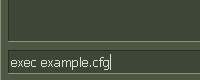
If you need a fresh Counter-Strike 1.6 installation to use this config on, download Counter-Strike 1.6 from our portal.
For the full game and related downloads, visit the Counter-Strike 1.6 homepage as well as get the Counter-Strike 1.6 download.