
HL Tag Converter Download – CS 1.6 Custom Spray Logo Maker
Last updated: October 2, 2026
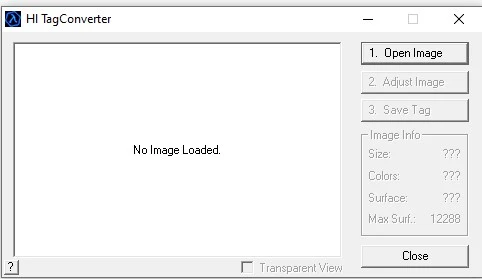
HL Tag Converter is a small Windows tool that turns any image into a custom spray logo for cs 1.6. Load a picture, adjust it, and save it as the spray file the game uses. It works for Counter-Strike 1.6, Half-Life and other GoldSrc games.
The tool needs no installation – extract the ZIP and run the .exe. Below: HL Tag Converter download, what the tool does and where the spray file goes.
HL Tag Converter download
Download HL Tag Converter (.ZIP)
What the cs 1.6 spray maker does
- Open Image: load a
.bmp,.jpgor.png - Adjust Image: resize to a spray size and convert to the 256-color palette the game needs
- Preview: see the size, colors and transparency before saving
- Save Tag: export as a
.wadspray file, save it straight to the game folder, or export as an image
Games that use HL Tag Converter sprays
- Counter-Strike 1.6 and Condition Zero
- Half-Life
- Team Fortress Classic
- Day of Defeat
- Sven Co-op
- Earth’s Special Forces and other Half-Life mods
Where the cs 1.6 spray file goes – tempdecal.wad
CS 1.6 reads your spray from tempdecal.wad in the cstrike folder. Save the tag there, or let the tool save it to the game folder for you:
- Steam:
C:\Program Files (x86)\Steam\steamapps\common\Half-Life\cstrike\tempdecal.wad - Non-Steam: your CS 1.6 install folder →
cstrike\tempdecal.wad
In the game press T to spray. Back up your old tempdecal.wad first if you want to keep the previous spray.
Full step-by-step guide with image sizes and settings: how to make a custom spray in cs 1.6.
Requirements
- Windows 7, 10 or 11
- No installation and no admin rights needed
To use your spray you need the game itself – get the full CS 1.6 download here.
For more guides and resources, visit the CS 1.6 download hub or get the CS 1.6 full version.