
Restrict Weapons CS 1.6 – restmenu.amxx Plugin Download
Last updated: October 1, 2026
restmenu.amxx is the AMX Mod X weapon restriction plugin for cs 1.6. It lets admins restrict weapons and equipment on the server – for example ban the AWP, run pistol-only rounds or block grenades – from an in-game menu or with console commands. Restricted items cannot be bought.
The plugin is made by the AMX Mod X team and is part of the default AMX Mod X install for Counter-Strike, so many servers already have it. Download CS 1.6 restrict weapons it here if it is missing from your server or if you want the .sma source.
restmenu.amxx download
The ZIP contains restmenu.amxx, the restmenu.sma source and the restmenu.txt language file.
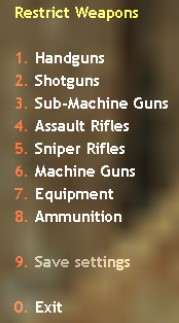
amx_restmenu – restrict weapons with the menu
Type amx_restmenu in your game console to open the restrict weapons menu:
| Key | Category |
|---|---|
| 1 | Handguns |
| 2 | Shotguns |
| 3 | Sub-Machine Guns |
| 4 | Assault Rifles |
| 5 | Sniper Rifles |
| 6 | Machine Guns |
| 7 | Equipment |
| 8 | Ammunition |
| 9 | Save settings |
Open a category and select an item to turn its restriction on or off. Press 9 – Save settings to keep the restrictions after a map change or restart. The menu opens in your own game, so you must be connected to the server as an admin – it cannot be opened through rcon.
Bind it to a key for quick access:
bind "j" "amx_restmenu"
amx_restrict – weapon restriction commands
amx_restrict <command> [value]
| Command | What it does |
|---|---|
amx_restrict on |
Restricts all weapons and equipment |
amx_restrict off |
Removes all restrictions |
amx_restrict on <value> |
Restricts the given items |
amx_restrict off <value> |
Removes the restriction from the given items |
amx_restrict list |
Shows the item names you can use as values, in pages 1 to 8 (amx_restrict list 2 for the next page) |
amx_restrict save |
Saves the current restrictions |
amx_restrict load [file] |
Loads restrictions, optionally from a file |
Run amx_restrict list first to see the exact item names, then use them as values, for example to restrict AWP in cs 1.6:
amx_restrict on awp
amx_restrict save
Both commands need the ADMIN_CFG access, which is flag h in users.ini.
Install restmenu plugin on a cs 1.6 server
First type amx_plugins in the server console. If Restrict Weapons (restmenu.amxx) already shows as running, the plugin is installed – just use the commands above. Otherwise:
- Extract
restmenu.zip - Upload
restmenu.amxxtocstrike/addons/amxmodx/plugins/ - Upload
restmenu.txttocstrike/addons/amxmodx/data/lang/ - Add
restmenu.amxxon a new line incstrike/addons/amxmodx/configs/plugins.ini - Restart the server and check with
amx_pluginsthat it is running
Restrict weapons not working – what to check
- “You have no access to that command”: the admin needs flag
h(ADMIN_CFG) - Restrictions gone after map change: save them with 9 – Save settings in the menu or
amx_restrict save - Unknown item name: use the names exactly as shown by
amx_restrict list - Players still get a restricted weapon: another plugin gives weapons directly (deathmatch, VIP or weapon menu plugins), not through the buy menu. Check those plugins’ own settings
- Plugin listed twice: make sure
restmenu.amxxappears only once inplugins.ini
Running pistol or knife rounds? See the cs 1.6 server types for other game modes, and the cs 1.6 admin commands list for more admin tools. Players without the game can get the CS 1.6 download here.
For more CS 1.6 resources, check the official CS 1.6 page as well as download CS 1.6 for PC.