
CS 1.6 Spawn Editor Plugin – Add and Fix Map Spawn Points
Last updated: October 2, 2026
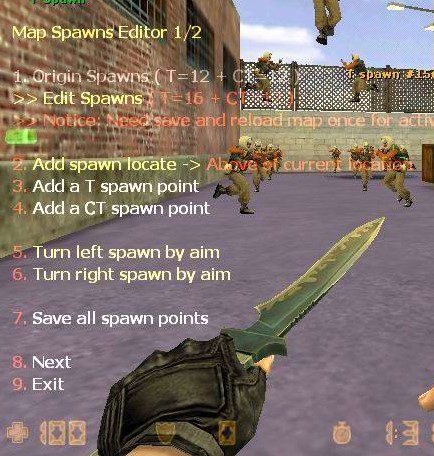
Counter-Strike Map Spawns Editor is an AMX Mod X spawn editor plugin for cs 1.6. Admins use an in-game menu to add new spawn points, delete bad ones and change the direction players face when they spawn – without editing the map file. It is the usual way to fix spawn death and badly placed spawns on counter-strike 1.6 servers.
A common use: many maps have only about 10 spawns per team. On a 32-slot server the extra players have nowhere to spawn. With this CS 1.6 amxx plugin you can add more spawns so every player gets a spawn point.
CS 1.6 Map spawns editor amxx download
Download CS 1.6 Map Spawns Editor (.ZIP)
| File | What it is |
|---|---|
map_spawns_editor.amxx |
Compiled plugin |
map_spawns_editor.sma |
Source code |
map_spawns_editor.txt |
Language file |
Install the cs 1.6 spawn editor
Requires AMX Mod X 1.76a or newer with the engine module enabled.
- Upload
map_spawns_editor.amxxtocstrike/addons/amxmodx/plugins/ - Upload
map_spawns_editor.txttocstrike/addons/amxmodx/data/lang/ - Add
map_spawns_editor.amxxon a new line inconfigs/plugins.ini - Restart the server or change the map, then check with
amx_pluginsthat it is running
How to edit spawn points in cs 1.6
You need admin access with the ban flag (d in users.ini).
- Turn the editor on in the console:
amx_spawn_editor 1
- Bind a key to the editor menu and press it:
bind "v" "amx_editor_menu"
- Use the menu to add a spawn where you stand, delete a spawn you aim at, or change a spawn’s angle
- Choose Save all spawns in the menu
- Turn the editor off when you are done:
amx_spawn_editor 0
Small edits apply right after saving. After bigger changes, like adding many spawns, change the map once so the new spawn list loads fully.
Spawn editor commands
| Command | What it does |
|---|---|
amx_spawn_editor 1 |
Turns the spawn editor on |
amx_spawn_editor 0 |
Turns the spawn editor off |
amx_editor_menu |
Opens the editor menu – add, delete, angles, save |
Spawn editor not working – what to check
- “You have no access to that command”: the admin needs the ban flag
d - Menu does not open: turn the editor on first with
amx_spawn_editor 1 - Plugin fails to load: the
enginemodule is not enabled inmodules.ini - New spawns not used: save with Save all spawns, then change the map
- Players still spawn on top of each other: the map needs more spawns than players – add spawns until each team has enough for your slot count
Keeping teams even on maps with few spawns? See the PTB team balancer. More tools: cs 1.6 admin commands list. Players without the game can get the CS 1.6 for free download here.
For more guides and resources, check the official CS 1.6 page or download CS 1.6 for PC.