
CS 1.6 Download in India – Free Old Counter-Strike for PC
Players in India can download Counter-Strike 1.6 free for PC and laptop from this page. The CS 1.6 download comes in three formats: EXE installer (156 MB), ZIP with no installation and RAR. Choose a file and get the Counter Strike free download directly with the buttons below.
This is the old version of Counter-Strike that most players know: Counter-Strike 1.6, full version, Non-Steam format, version 1.1.2.6, Build 4554, Protocol 48. Play online, over LAN with friends or offline against bots.
Counter-Strike 1.6 Download in India – Free Full Version for PC
Choose how you want to download CS 1.6 for PC:
- ✓EXE installer: the easiest option. Run the file, install and play.
- ✓ZIP (portable): no installation needed. Extract the folder and start the game.
- ✓RAR: the same game in a smaller archive, for WinRAR or 7-Zip.

CS 1.6 Download Details
| Game | Counter-Strike 1.6 |
| Version | 1.1.2.6 |
| Build | 4554 |
| Protocol | 48 |
| Type | Non-Steam |
| EXE installer | 156 MB |
| ZIP, no installation | 205 MB |
| RAR | 185 MB |
| Ads / extra software | None |
| Game modes | Online, LAN and offline |
| Bots | Included |
| Security scan | VirusTotal (EXE installer) |
Counter-Strike 1.6 in India – the cyber cafe classic
In India, Counter-Strike 1.6 was the game of cyber cafes and college LAN parties: de_dust2, cs_assault and long evenings with friends. Players still look for this old version because it is small, fast and runs on almost any PC or laptop.
This classic CS 1.6 is version 1.1.2.6 (Build 4554, Protocol 48), with no changes to the gameplay. It includes the classic maps, player and weapon models, textures and sounds – Terrorists against Counter-Terrorists, as always.
What you get with this Counter-Strike 1.6 download
- •Online servers: find CS 1.6 servers inside the game through Find Servers.
- •Favorites: save your servers to join them again quickly.
- •LAN: play with friends on the same network, just like at the cyber cafe.
- •Bots: play offline against computer-controlled players.
- •No ads: the installer adds no ads or extra programs.
- •Small download: the installer is only 156 MB, easy to download even on a slow or mobile data connection.
CS 1.6 for low-end PC and laptop
CS 1.6 for low-end PC runs on old laptops, budget PCs and computers without a dedicated graphics card.
CS 1.6 minimum and recommended requirements
| Component | Minimum | Recommended |
|---|---|---|
| Processor | 500 MHz | 800 MHz |
| RAM | 96 MB | 128 MB |
| Graphics | 16 MB, OpenGL | 32 MB or more |
| System | Windows XP or newer | |
About 500 MB of free space is recommended for installation. The table shows the original game requirements. On newer Windows versions, performance also depends on graphics drivers and system settings.
Counter-Strike 1.6 download for Windows 11, 10 and 7
The Counter-Strike 1.6 download for Windows 11 runs on most modern PCs, and also on Windows 10 and Windows 7. The game can also work on Windows 8 and XP, on both 32-bit and 64-bit systems.
How well it runs can depend on your PC, graphics drivers and Windows settings.
How to install Counter-Strike 1.6 on PC
EXE installer
- Click Download CS 1.6 – EXE Installer.
- Wait for the download to finish.
- Open the EXE file.
- Choose the folder where you want to install the game.
- Click Install.
- When it finishes, start Counter-Strike 1.6 from the desktop shortcut.
ZIP, no installation
- Click Download CS 1.6 – ZIP, No Installation.
- When the download finishes, open the ZIP file.
- Choose Extract All or use 7-Zip/WinRAR.
- Open the extracted folder.
- Run
hl.exe.
RAR archive
- Click Download CS 1.6 – RAR.
- Open the RAR file with WinRAR or 7-Zip.
- Choose Extract Here or extract it to another folder.
- Open the extracted folder.
- Run
hl.exe.
The ZIP and RAR versions do not need installation. Once extracted, you can keep the game in any folder.
Play CS 1.6 online on Indian servers
To play CS 1.6 online, open the game and use the built-in server browser:
- Start Counter-Strike 1.6.
- Click Find Servers.
- Open the Internet tab.
- Wait for the server list to load.
- Pick a server and join.
Sort the servers by ping: from India, servers in India or nearby countries usually give the lowest ping. You can also find CS 1.6 servers in India on GameTracker.
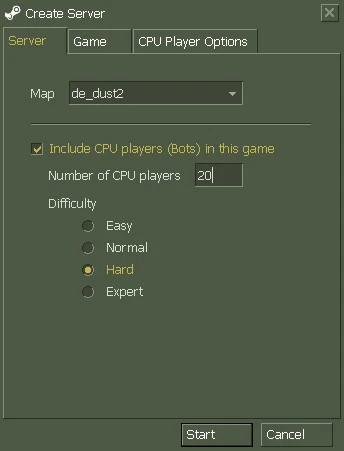
CS 1.6 with bots – play offline
No internet or want to practice alone? CS 1.6 with bots works offline, and the bots are already included, so you do not need to download anything else.
- Start the game and click New Game.
- In the Create Server window, choose a map or leave Random Map.
- Tick Include CPU players (Bots) in this game.
- Under Number of CPU players, choose how many bots you want.
- Choose the difficulty: Easy, Normal, Hard or Expert.
- Click Start.
During a match you can also add or remove CS 1.6 bots through the console:
bot_add_ct
bot_add_t
bot_difficulty 2
bot_kick
- ›
bot_add_ctadds a bot to the Counter-Terrorists. - ›
bot_add_tadds a bot to the Terrorists. - ›
bot_difficulty 2sets bot difficulty: 0 easy, 1 normal, 2 hard, 3 expert. - ›
bot_kickremoves all bots.
Counter-Strike 1.6 download without Steam
This is a CS 1.6 Non-Steam download, so you do not need a Steam account or the Steam app.
- No account: install or extract the game and start it right away.
- Online: join most community servers, although some servers may not accept Non-Steam players.
- LAN and offline: play with friends on a network or against bots.
The official Counter-Strike version is distributed by Valve through Steam. This page is not affiliated with Valve and does not replace the official Steam version.
Is it safe to download CS 1.6 here?
The EXE installer was scanned on VirusTotal. The package comes without ads or extra programs.
When you open the file, Windows may show “Windows protected your PC”. This happens when an installer has no digital signature or does not yet have enough SmartScreen reputation. The warning by itself does not mean the file contains a virus.
Before running the installer, you can check the VirusTotal report. If it is clean and you trust the file, click More info and then Run anyway.
Counter-Strike 1.6 download FAQ
How can I download Counter-Strike 1.6 free in India?
Click one of the buttons at the top of this page: EXE, ZIP or RAR. All three are free and include the full game.
Is this the full version of Counter-Strike 1.6?
Yes. It includes all files needed to install and play Counter-Strike 1.6.
Is this the old version of Counter-Strike?
Yes. Counter-Strike 1.6 is the classic old version of Counter-Strike: version 1.1.2.6, Build 4554, Protocol 48, in Non-Steam format, with no changes to the gameplay.
Is there a highly compressed CS 1.6?
The installer here is already small: 156 MB, and the RAR is 185 MB. There is no need for “highly compressed” repacks from unknown sites, which often come with broken files or malware.
Is CS 1.6 available in Hindi?
No, the game menus are in English, as in the original game. They are simple: New Game starts a match, Find Servers lists servers and Options opens the settings. On Indian servers you can chat in Hindi or English.
Which file should I download?
For a normal installation, choose the EXE. If you do not want to install anything, choose the ZIP or RAR: extract it and run hl.exe.
Will CS 1.6 run on a low-end PC or laptop?
Yes. The original minimum requirements are a 500 MHz processor, 96 MB RAM and a 16 MB graphics card, so it runs on old laptops and PCs without a dedicated graphics card.
Does CS 1.6 work on Windows 11?
Yes, CS 1.6 can run on Windows 11, 10, 8, 7 and XP. It can depend on your PC, drivers and settings.
Can I play CS 1.6 offline with bots?
Yes. Bots are included. Click New Game, tick Include CPU players (Bots), choose the difficulty and play.
Do I need Steam to play CS 1.6?
No. This version works without Steam: no account and no Steam app needed.
Download Counter-Strike 1.6
Download Counter-Strike 1.6 and play the cyber cafe classic again on your PC or laptop.