
Counter Strike 1.6 Download – Free CS 1.6 Full Version PC
You can download Counter Strike 1.6 free for PC or laptop from this page. The CS 1.6 download is available in three formats: EXE installer (setup file), portable ZIP and RAR. Choose the version you want and download CS1.6 directly using the buttons below.
This is a classic full Counter-Strike 1.6 Non-Steam client (no Steam required) based on version 1.1.2.6, Build 4554 and Protocol 48. It includes support for online play, LAN games and offline matches with bots.
Counter Strike 1.6 Free Download – Full Version for PC
Choose the CS 1.6 free download format that works best for your PC or laptop:
- ✓EXE installer: the simplest option. The setup file installs CS 1.6 normally on your PC.
- ✓Portable ZIP: extract the folder and run the game without a traditional installation.
- ✓RAR: a compressed version for users who prefer WinRAR, 7-Zip or another compatible archive program.
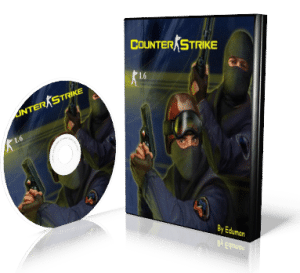
Counter Strike 1.6 Download Details
| Game | Counter-Strike 1.6 (CS 1.6 / CS1.6) |
| Version | 1.1.2.6 |
| Build | 4554 |
| Protocol | 48 |
| Type | Non-Steam (no Steam required) |
| Platform | Windows PC and laptop |
| EXE Installer | 156 MB |
| Portable ZIP | 205 MB |
| RAR | 185 MB |
| Installation | Clean / no advertisements |
| Gameplay | Online, LAN and offline |
| Bots | Included |
| Verification | VirusTotal scan |
Classic Counter-Strike 1.6 and Old Version
Classic Counter-Strike 1.6 is the old version of Counter-Strike that remains one of the classic releases of the game. Unlike newer Counter-Strike titles, CS 1.6 keeps the original gameplay style, classic maps, simple graphics and low system requirements that made it popular on older PCs.
This CS 1.6 download uses version 1.1.2.6, Build 4554 and Protocol 48. It is intended for players who want a classic Counter-Strike 1.6 client rather than a modern Counter-Strike release.
This original CS 1.6 download includes the original CS 1.6 game files, including classic maps, player and weapon models, skins, textures, sounds, sprites and other game assets. The client keeps the original Counter-Strike 1.6 gameplay, classic game modes and familiar Terrorist and Counter-Terrorist teams.
CS1.6, CS 1.6 and CS 16 are all common ways of writing the same game, so if you were looking for a Counter Strike game download for PC in any of those spellings, you are in the right place.
Counter-Strike 1.6 Features
The CS 1.6 client provides the main features needed for classic Counter-Strike gameplay on PC, so this game download covers online, LAN and offline play.
- •Internet servers: find available Counter-Strike 1.6 servers through the in-game server browser.
- •Favorites: save servers you want to find again later.
- •LAN: play Counter-Strike 1.6 on a local network.
- •Bots: play offline on compatible maps without joining an online server.
- •Clean installation: no advertisements or additional software included.
- •Low hardware requirements: CS 1.6 was designed for computers much less powerful than modern gaming PCs.
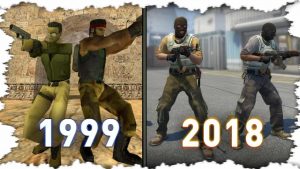
Counter-Strike 1.6 for Low-End PCs and Laptops
Counter-Strike 1.6 is still suitable for older laptops, office computers and PCs without a dedicated graphics card. Its original hardware requirements are very low compared with modern games, which makes it an easy Counter Strike download for laptop users as well as desktop PCs.
CS 1.6 Minimum Requirements
| Component | Requirement |
|---|---|
| Processor | 500 MHz or higher |
| RAM | 96 MB or higher |
| Graphics | 16 MB with OpenGL support |
| Free space | Approximately 500 MB |
| Operating system | Windows XP or newer |
These are the original game requirements. On modern Windows systems, actual compatibility and performance can also depend on graphics drivers and system configuration.
Recommended CS 1.6 Requirements
| Component | Requirement |
|---|---|
| Processor | 1 GHz or higher |
| RAM | 256 MB or higher |
| Graphics | 32 MB or higher with OpenGL support |
| Free space | 1 GB |
| Operating system | Windows 7, 8, 10 or 11 |
The recommended specifications provide a more practical baseline for running CS 1.6 comfortably on a modern Windows PC.
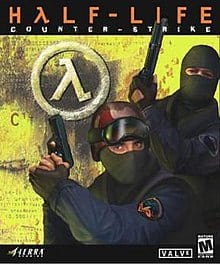
Counter Strike 1.6 Download for Windows 11, 10 and 7
You can install CS 1.6 on Windows 11, while CS 1.6 for Windows 10 and Windows 7 are also relevant for PCs using those operating systems. The game can also run on Windows 8 and Windows XP, including 32-bit and 64-bit systems.
The three downloads above can be used as a Counter Strike 1.6 free download for Windows 10 and Windows 11. Pick the EXE installer if you want a normal setup, or the portable ZIP or RAR if you prefer to extract and run the game from a folder.
Compatibility can vary depending on your hardware, graphics drivers and Windows configuration.
How to Download and Install Counter Strike 1.6 on PC
To download Counter Strike on your PC, pick one of the formats above and follow the matching steps below.
EXE Installer
- Click the DOWNLOAD CS 1.6 – EXE INSTALLER button above.
- Wait for the download to finish.
- Open the downloaded EXE (setup) file.
- Choose the folder where you want to install the game.
- Click Install.
- After installation, launch Counter-Strike 1.6 using the shortcut created on your PC.
Portable ZIP Version
- Click DOWNLOAD CS 1.6 – ZIP button above.
- Open the ZIP file after the download finishes.
- Choose Extract All or use 7-Zip/WinRAR.
- Open the extracted folder.
- Run
hl.exe.
RAR Version
- Click DOWNLOAD CS 1.6 – RAR button above.
- Open the RAR archive with WinRAR or 7-Zip.
- Choose Extract Here or extract it to a folder of your choice.
- Open the extracted folder.
- Run
hl.exe.
The ZIP and RAR versions do not require a traditional installation. After extracting the files, you can keep the game in the folder you choose or run it from a portable drive.
Play Counter-Strike 1.6 Online
To play CS 1.6 online, open the game and use the built-in server browser.
- Open Counter-Strike 1.6.
- Click Find Servers.
- Select the Internet tab.
- Wait for the server list to load.
- Choose a server and join the game.
You can sort through available servers and check the ping shown in the server browser. You can also use external server listings such as GameTracker.
Play CS 1.6 Offline with Bots
The CS 1.6 offline mode lets you create local matches and play against bots without joining an online server. The bots are included with this installation.
- Open the game and click New Game.
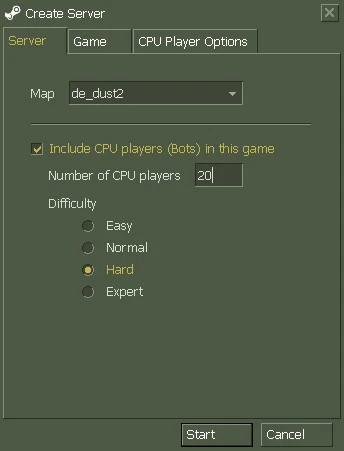
- In the Create Server window, choose a map or leave Random Map.
- Check Include CPU players (Bots) in this game.
- Choose the number of CPU players.
- Select the difficulty: Easy, Normal, Hard or Expert.
- Click Start.
During a game, CS 1.6 bots can also be added or removed through the console:
bot_add_ct
bot_add_t
bot_difficulty 2
bot_kick
- ›
bot_add_ctadds a bot to the Counter-Terrorist team. - ›
bot_add_tadds a bot to the Terrorist team. - ›
bot_difficulty 2sets bot difficulty to 2 (Hard). - ›
bot_kickremoves all bots.
Counter Strike 1.6 Without Steam – No Steam Download
This page provides a CS 1.6 Non-Steam download for players who want Counter Strike 1.6 with no Steam required. It can be launched without a Steam account or the Steam client.
- No Steam account: install or extract the client and launch the game directly.
- Online: connect to most community servers, although server compatibility can vary.
- LAN and offline: play over a local network or against bots.
The official Counter-Strike distribution is available from Valve through Steam. This page does not represent Valve and does not replace the official Steam version.
Is the CS 1.6 Download Safe?
The EXE installer has been checked with VirusTotal. The installation does not include advertisements or additional software.
Windows may display a “Windows protected your PC” SmartScreen warning when an installer does not have a digital signature or does not yet have enough reputation with Microsoft SmartScreen. That warning by itself does not establish that a file contains a virus.
Before running the installer, you can check the current file with VirusTotal yourself. If the scan is clean and you trust the source, Windows provides the More info option followed by Run anyway.
Frequently Asked Questions About CS 1.6
How to download Counter Strike 1.6 for free on PC?
Use one of the download buttons at the top of this page. You can choose the EXE installer, portable ZIP or RAR version. All three downloads contain the CS 1.6 client, and the install steps for each format are listed above.
Is this a full Counter Strike 1.6 download?
Yes. The available downloads provide the Counter-Strike 1.6 client, including the files required to install or run the game. You can choose between EXE, ZIP and RAR formats.
Is this the original Counter Strike 1.6?
This download is the classic Counter-Strike 1.6 client (version 1.1.2.6, Build 4554, Protocol 48) with the original game files, maps, models, sounds and gameplay. It is a Non-Steam client, so it is distributed separately from the official Steam version from Valve.
Is CS1.6 the same as Counter-Strike 1.6?
Yes. CS1.6, CS 1.6 and CS 16 are common ways players write Counter-Strike 1.6. They all refer to the same game version covered on this page.
Is this an old version of Counter-Strike?
CS 1.6 is a classic version of Counter-Strike. This download uses version 1.1.2.6, Build 4554 and Protocol 48.
Which Counter-Strike 1.6 file should I download?
The EXE installer (setup file) is the easiest option if you want a normal installation. The ZIP and RAR versions are portable and can be extracted without a traditional installation.
How much space does CS 1.6 need?
The EXE installer is 156 MB, the portable ZIP is 205 MB and the RAR archive is 185 MB. The installed game uses approximately 500 MB of disk space.
Does CS 1.6 run on a low-end PC or laptop?
Yes. The original minimum requirements are a 500 MHz processor, 96 MB of RAM and a 16 MB graphics card with OpenGL support. Modern PCs and laptops are generally far above these original requirements.
Can I download Counter Strike for a laptop?
Yes. The process is the same as on a desktop PC: use the download buttons above, choose the EXE installer or a portable ZIP/RAR version, and follow the steps for that format. Because the system requirements are low, CS 1.6 also suits older Windows laptops.
Does Counter Strike 1.6 work on Windows 11 and Windows 10?
CS 1.6 can run on Windows 11, Windows 10, Windows 8, Windows 7 and Windows XP. Compatibility may depend on the individual PC, drivers and system configuration.
Can I play CS 1.6 offline with bots?
Yes. Bots are included. Open New Game, enable Include CPU players (Bots), select the difficulty and start the match without joining an online server.
Can I play CS 1.6 online?
Yes. Open Find Servers, select the Internet tab and choose an available server. Server compatibility can vary with Non-Steam clients.
Do I need Steam to play this CS 1.6 version?
No. This is a no-Steam (Non-Steam) client and does not require a Steam account or the Steam client to launch the game. The official Steam version is distributed separately by Valve.
Is the CS 1.6 download safe?
The EXE installer has been checked with VirusTotal. You can also run your own scan before opening the file. Windows SmartScreen can display a warning for unsigned or low-reputation installers; that warning alone does not mean the file contains a virus.
For the full game and related downloads, visit the CS 1.6 download hub as well as get the CS 1.6 full version.