
Download CS 1.6 Colored Player Model | Red and blue
Last updated: April 9, 2026
Red and blue CS 1.6 player model
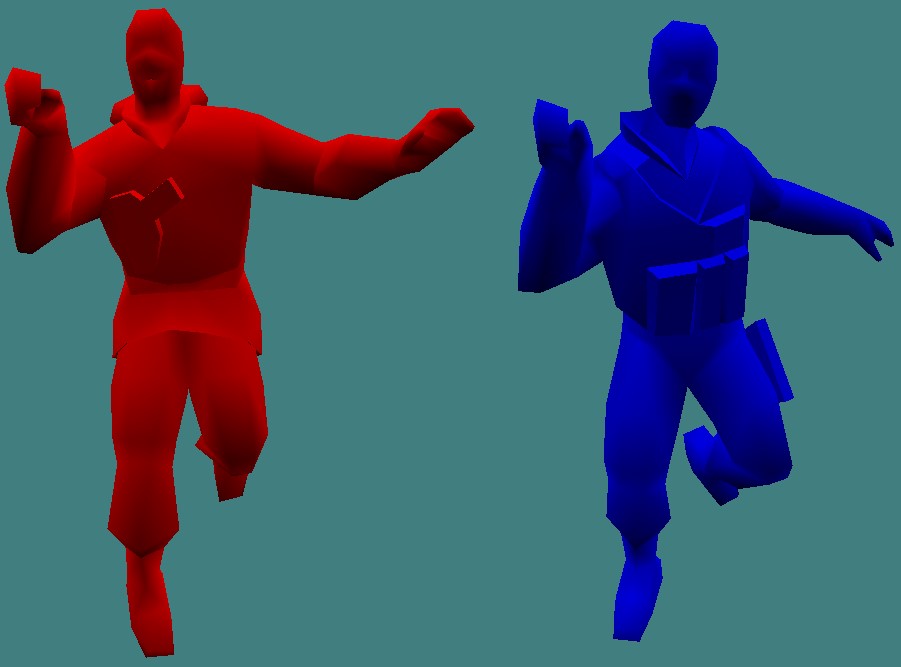
The red and blue CS 1.6 player model pack is a essential modification for players seeking maximum visibility. These CS 1.6 colored models replace standard character textures with high visibility player skins. These bright player models use solid colors, bright red for Terrorists and bright blue for Counter-Terrorists, to improve target acquisition in dark areas or complex map environments.
Download player colored model Link
- Download: CS 1.6 Colored Models (.zip)
Installing CS 1.6 Colored players models
Follow these steps for a proper red and blue CS 1.6 player model replacement:
- Extract the Archive: Open
CS_1.6_Colored_Models.zip. The models/player directory contains the following character folders:arctic,gign,gsg9,guerilla,leet,sas,terror,urban,vip.
- Locate Game Directory: Navigate to your Counter-Strike installation:
- Steam:
Steam\steamapps\common\Half-Life\cstrike\models\player - Non-Steam: Typically
C:\Gaming\CS 1.6\cstrike\models\player
- Steam:
- Transfer Files: Copy the folders containing the red terror blue ct models into your game’s
playerdirectory. Overwrite the existing files when prompted. - Backup: Always keep a copy of your original files before applying CS 1.6 red and blue hit models so you can revert to standard skins for online play.
Why Use Colored Models for Training?
- High Contrast: These bright player models eliminate “blending” on dark maps like de_train or de_aztec.
- Hitbox Focus: Using visual clarity skins increases the speed at which your brain identifies target locations.
- Bot Practice: This is the most efficient way to practice “head-level” pre-aiming during aim practice sessions with a red and blue CS 1.6 player model.
For a stable setup, use an optimized game version. You can download Counter-Strike 1.6 from our site, which is compatible with all custom CS 1.6 training skins.
Important Warning: Usage Restrictions
Before you download CS 1.6 skins and install them, note these restrictions:
- Server Bans: Most CS 1.6 server owners strictly prohibit using red and blue player models. Servers utilize CS 1.6 server protection plugins to check file integrity. Detecting these visual clarity skins can result in an automatic kick or ban.
- Fair Play: In competitive play, these CS 1.6 training skins are considered an unfair advantage because they bypass map-specific camouflage.
- Recommended Use: These are intended for training with bots (offline). They serve as excellent aim practice models to help focus on hitboxes and crosshair placement.
For the full game and related downloads, check the official CS 1.6 page as well as download CS 1.6 for PC.