
Fix Missing AWP Crosshair Dot in Counter-Strike 1.6
Last updated: February 8, 2026
Fix CS 1.6 Missing AWP Crosshair
One of the most frustrating technical issues in the game is when the CS 1.6 AWP red dot disappears from the center of your scope. This tiny pixel is vital for precision, and its absence can completely ruin your sniping performance. If you are struggling with a CS 1.6 missing red dot in scope, you have come to the right place for a definitive fix.
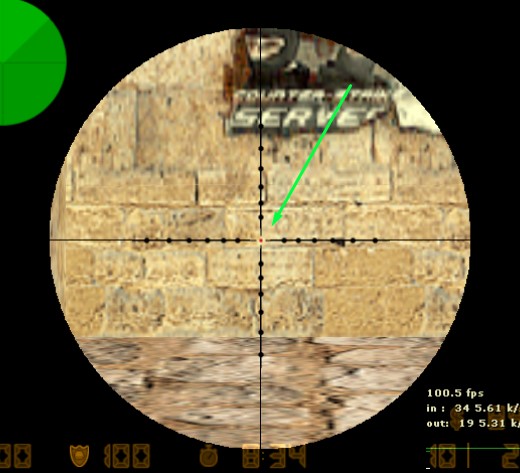
Primary command fix awp crosshair: crosshair 1
The most common reason for the CS 1.6 AWP scope dot not showing is a disabled setting in the game’s console. This often happens after a configuration reset or a fresh installation. To quickly restore the AWP center dot in CS 1.6, follow these steps:
- Open your console by pressing the ~ (tilde) key.
- Type the following command:
crosshair 1 - Press Enter.
Once this CS 1.6 AWP crosshair command fix is applied, the red dot should immediately reappear the next time you use the right-click zoom on your AWP or Scout. If you find your CS 1.6 AWP crosshair not working even after this, the problem might lie deeper in your graphics settings.
Why does the AWP dot disappear?
There are several reasons why you might experience the CS 1.6 sniper scope no dot problem. Understanding the root causes can help you prevent the CS 1.6 AWP red dot bug from recurring.
Configuration Reset (Read-Only Files)
If you apply the fix but find your CS 1.6 AWP settings revert every time you launch the game, your config.cfg might be set to “Read-only.”
- Navigate to your
cstrikefolder. - Right-click config.cfg -> Properties.
- Uncheck Read-only, save the changes, and re-apply the CS 1.6 crosshair settings in the console.
Graphics Bugs and Scope Rendering
Many CS 1.6 graphics bugs related to scope rendering occur when using outdated video drivers or the wrong renderer. For a permanent CS 1.6 scope bug fix, ensure your video settings (Options > Video) are set to OpenGL. The “Software” and “D3D” modes are legacy systems that are known to cause a CS 1.6 AWP crosshair not working error where the sprite fails to load on the screen correctly.
Resolution and Sprite Scaling
Sometimes the missing scope dot issue is tied to high-resolution scaling. If the default CS 1.6 AWP scope dot is too small to see, it might be due to your monitor’s DPI settings. Setting gl_spriteblend 0 in the console can often make the dot appear sharper and more defined against the background textures.
Awp Settings
To solve the CS 1.6 AWP crosshair dot missing issue permanently and maintain a competitive edge, ensure your userconfig includes these optimized parameters:
crosshair 1– Enables the center dot within the scope.cl_crosshair_size small– Controls the size of the standard crosshair (when not scoped).gl_spriteblend 0– Increases the visibility of the red dot for better CS 1.6 AWP precision.cl_dynamiccrosshair 0– Keeps your crosshair stable while moving, which is a common CS 1.6 AWP setting for pros.
By using the crosshair 1 CS 1.6 command, you ensure that your AWP remains a deadly and accurate tool, eliminating any CS 1.6 missing scope dot issue that might hinder your gameplay.
Still Having Issues?
If you have tried all the steps above and the AWP crosshair is still missing or bugged, it might be an issue with your game client’s build. To fix this permanently, you can download Counter-Strike 1.6 from our website. Our version comes with a fully optimized configuration where the AWP center dot is correctly enabled and fixed by default.
To grab the original download Counter-Strike 1.6 build here as well as see all the available game resources, feel free to use our links. To ensure your game works perfectly.