
How to Get More Blood and Gore in Counter-Strike 1.6
Last updated: June 17, 2026
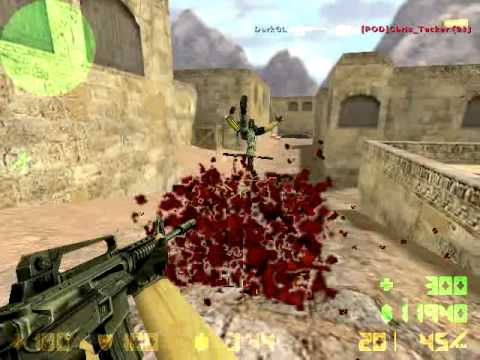
Counter-Strike 1.6 ships with its gore effects toned down by default on many setups, but turning on more blood in CS 1.6 just takes a handful of console commands. Getting more gore in Counter-Strike 1.6 works differently depending on whether you’re changing it for your own game or making it apply to everyone on a server you run.
For players – more blood in cs 1.6 on your own game:
- Check Content Lock before changing blood settings
- CS 1.6 console commands for more blood and gore
- CS 1.6 Steam launch options for permanent gore
- How to reduce or disable blood in cs 1.6 instead
For server owners – force more blood in cs 1.6 for everyone:
Both:
For players – more blood in cs 1.6 on your own game
Check Content Lock before changing cs 1.6 blood settings
Before touching any console commands, check whether Content Lock is enabled in your Counter-Strike 1.6 settings, since it overrides everything below and is the most common reason these blood and gore commands appear to do nothing. Content Lock (also called low-violence mode) exists for regions where game gore is restricted by law, and when it’s active, blood and gibs in CS 1.6 stay capped regardless of what you set the cvars to.
Go to Options, then look for Lock (or Multiplayer settings, depending on your version) and uncheck Content Lock. Only after this is off will the more-blood commands below have any visible effect.
CS 1.6 console commands for more blood and gore
Open the console with ~ and enter these more blood console commands one at a time, or add them to your autoexec.cfg to make more blood and gore permanent for your CS 1.6 client:
violence_ablood 1
violence_hblood 1
violence_agibs 1
violence_hgibs 1
gl_spriteblend 0
These cs 1.6 blood cvars are simple toggles in standard GoldSrc – 1 turns the effect on, 0 turns it off, and there’s no higher setting beyond 1 in the base engine. violence_ablood/violence_hblood control animal and human blood specifically, while violence_agibs/violence_hgibs control gib (body part) effects on death. gl_spriteblend 0 makes blood sprites render more solidly instead of blending with the background, which makes the gore effect noticeably more visible in CS 1.6. If a guide tells you to set these to 2 or 3 for “more” gore, that’s mixing up the base engine with custom server mods that add their own extended violence cvar – the values above are everything the stock engine recognizes.
One important limitation: these settings only affect what your own client renders. If you join a server that has gore effects forced lower or disabled server-side, your local more-blood settings won’t override that – the server’s settings always take priority for what actually happens in a CS 1.6 match.
CS 1.6 Steam launch options for permanent gore
If you’re on Steam, you can also set more blood in CS 1.6 through launch options so it’s applied automatically every time you launch, without needing an autoexec entry. Right-click Counter-Strike in your Steam library, Properties, Launch Options, and add:
+violence_ablood 1 +violence_agibs 1 +violence_hblood 1 +violence_hgibs 1 +gl_spriteblend 0How to reduce or disable blood in cs 1.6 instead
The same cs 1.6 violence cvars work in reverse if you want less gore rather than more – set any of them to 0 to disable that specific blood effect entirely. This is also how Content Lock effectively functions internally in Counter-Strike 1.6, just enforced rather than optional.
For server owners – force more blood in cs 1.6 for everyone
Setting cs 1.6 violence cvars in server.cfg
If you want every player connecting to your Counter-Strike 1.6 server to see increased gore regardless of their own client settings, add the same cvars to your server’s cstrike/server.cfg:
violence_ablood 1
violence_hblood 1
violence_agibs 1
violence_hgibs 1
Restart the server for the more-blood change to take effect. Keep in mind a client with Content Lock enabled may still render reduced effects locally even with the server set to 1 – server-side settings determine what’s available, but a heavily restricted client setup can still cap what that specific player sees.
CS 1.6 AMXX gore plugin for extra blood effects
If you’re already running AMX Mod X on your CS 1.6 server, a basic gore plugin like the community-made CS Gore Lite plugin from the AlliedModders forum adds specific extra death effects beyond the simple on/off the base cvars control – things like a blood spray triggered specifically by headshots, or a gib effect on C4 and grenade deaths, using the game’s own default Half-Life assets so no extra custom files are needed.
This cs 1.6 gore plugin typically exposes a single cvar (commonly amx_gore) with letter flags to toggle each effect type independently, and still expects the base violence_* cvars above to be set to 1 in your server.cfg for the underlying gore system to be active in the first place – the plugin adds specific triggered effects on top of that baseline, it doesn’t replace it.
CS 1.6 blood and gore cvars reference
| Cvar | Controls | Values |
|---|---|---|
violence_hblood |
Human blood effects | 0 (off) or 1 (on) |
violence_ablood |
Animal/NPC blood effects | 0 (off) or 1 (on) |
violence_hgibs |
Human gib (body part) effects | 0 (off) or 1 (on) |
violence_agibs |
Animal/NPC gib effects | 0 (off) or 1 (on) |
gl_spriteblend |
How blood sprites render against the background | 0 (solid, more visible) or 1 (blended, default) |
If you want gore beyond what these base values allow – extra triggered effects, not just on/off – that’s what the AMXX plugin covered above is actually for, since the stock engine itself has no “more than on” setting.
If you don’t have the game installed yet, download Counter-Strike 1.6 from our portal.
For installation guides and game files, browse the Counter-Strike 1.6 site or also grab the Counter-Strike 1.6 installer.